Limited-time offer: Get 60% off for 3 months. Buy now & save
60% Off for 3 Months Buy now & save


Free invoice generator:
create professional invoices effortlessly
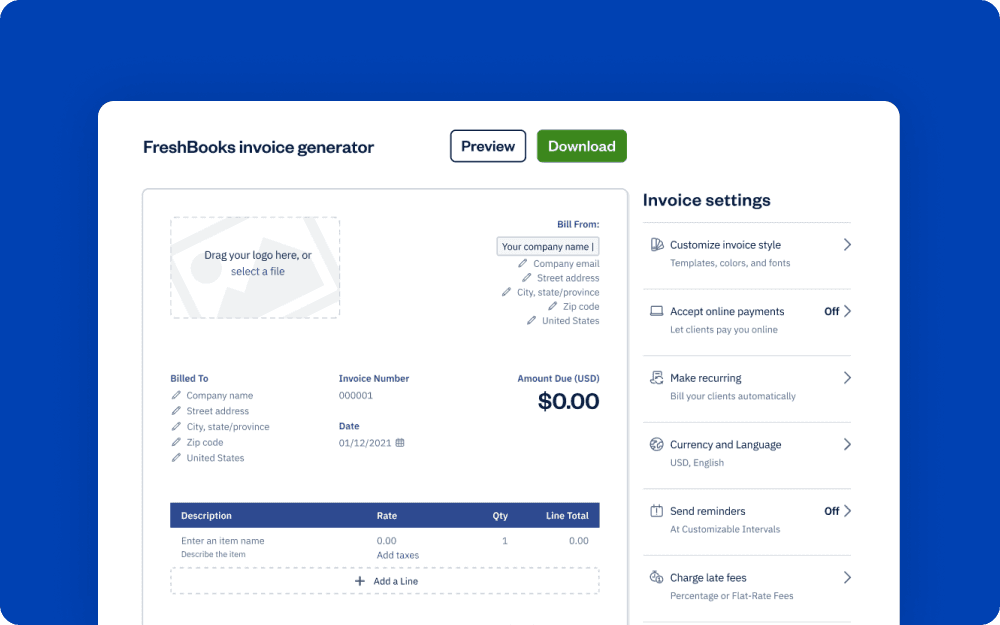
Creating invoices doesn’t have to be a headache. For small business owners looking for a straightforward solution, FreshBooks invoice generator tool can simplify the process.





FreshBooks Invoice Generator
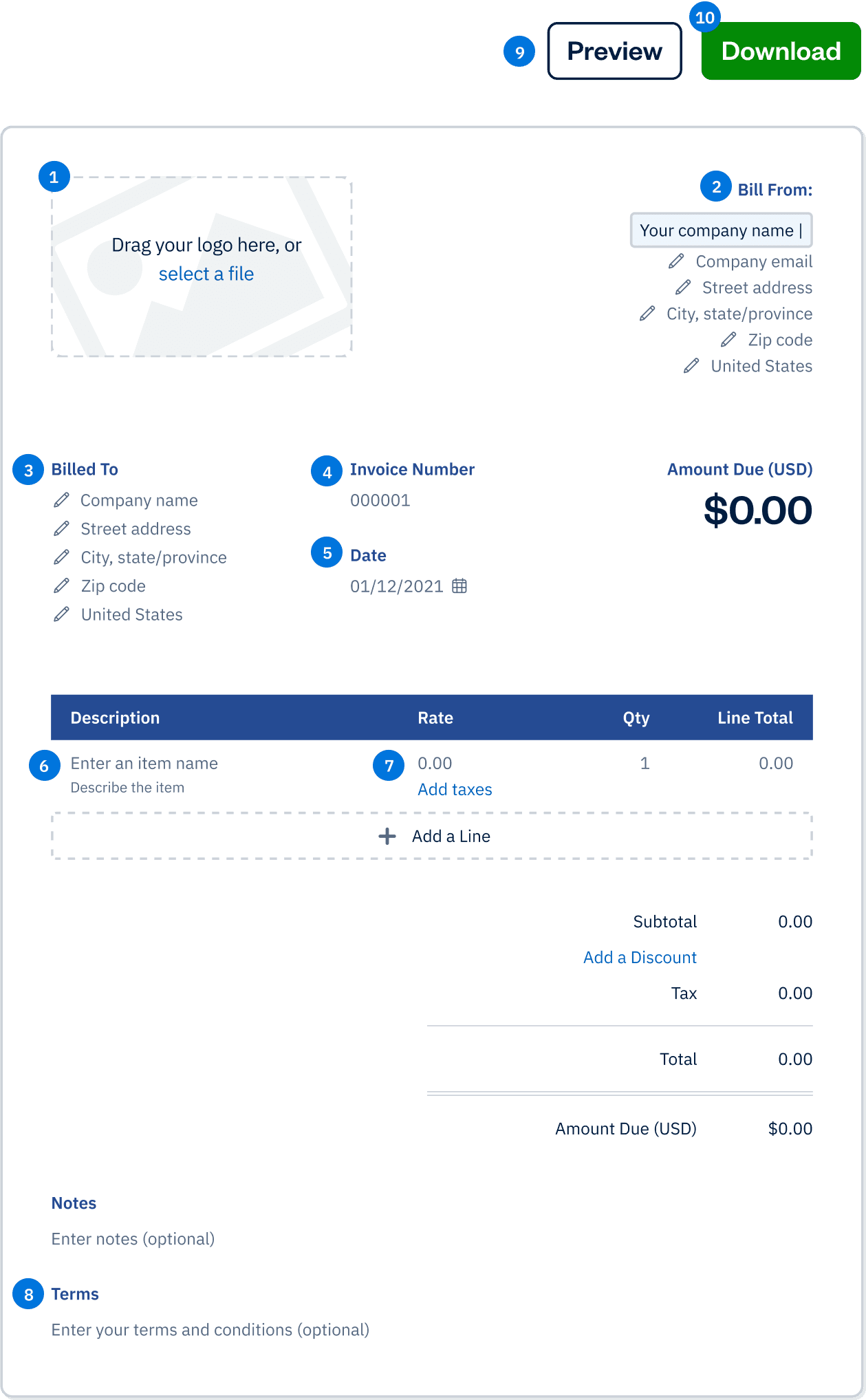
Drag your logo here, or select a file
Bill From:
Bill To:
Invoice Number:
Date:
Amount Due (USD)
$0.00
| Description | Rate | Qty | Line Total |
|---|---|---|---|
Enter an item name Describe this item | 0.00 | 1 | 0.00 |
| Subtotal | 0.00 |
|---|---|
| 0.00 | |
| Total | 0.00 |
| Amount Due (USD) | $0.00 |
Invoice templates vs. Invoice generator: which is right for your business?
Feature | Invoice Templates | Invoice Generator |
|---|---|---|
Format | A free invoice template is a document you can adapt to your needs. They provide a basic structure where you add your company information, client details, and specifics of the products or services. A standard invoice format includes essential elements like business and customer information, invoice specifics, items sold, and financial totals. | A tool that allows you to create an invoice online. These tools often produce a polished final invoice with a clean, professional appearance. |
Customization Level | Because they’re downloadable, you have significant editing control over layout, fonts, and design to align with your branding. | They might offer less detailed customization than downloadable templates. |
Design | Customized invoice design creates a professional impression and aids prompt payment. | These tools often produce a polished final invoice with a clean, professional appearance. |
Ease of Use | Requires manual input and formatting | Features like automatic calculations for totals and tax (GST/HST), and easy-to-use fields for line items and discounts are common. |
Tax Handling | User is responsible for accurate tax calculation (GST/HST) | Often includes fields for tax calculation (GST/HST) |
How to create an invoice with the free invoice generator
The free invoice creator is a simple, user-friendly tool—and it does all the math for you.
It can automatically calculate subtotals, totals, and taxes, reducing manual entry errors and speeding up the invoice preparation process.
Invoice heading
Stick with the standard template or opt for a more modern style. Change the colour of your blank invoice template, and add your business logo if you wish.
Company name and contact information
Include your company’s name, address, and phone number.
client name and details
Add the client’s name, address, and phone number.
Invoice number
Enter your own invoice number, or allow the invoice generator to choose it for you.
Invoice date
Enter the date of the invoice.
Description of services rendered
Fill out a single line item detailing each product or service sold and the quantity.
Cost of services and tax
Enter the rate or cost of the services or products provided along with GST/HST.
Payment terms, conditions, and instructions
Click the black “Preview Invoice” button near the top, and carefully review your work for accuracy. To exit preview mode, simply click outside of the invoice.
Preview your invoice
Click the black “Preview Invoice” button near the top, and carefully review your work for accuracy. To exit preview mode, simply click outside of the invoice.
Download and save your invoice
Once you’re satisfied with your work, click “Download Invoice.”
Confirm your email address, and click “Get My Invoice.” The download link for your invoice is automatically sent to your email address. The invoice will also open as a PDF on your computer screen.
Key elements of a professional invoice
A professional invoice typically includes the following key elements:
Business information
Clearly display your company name, address, and contact details to ensure your client knows who the invoice is from.
Invoice number and date
Assign a unique invoice number and include the invoice date to keep track of each transaction.
Customer information
Include the customer’s name, address, and contact details to personalize the invoice and ensure it reaches the right person.
Description of goods or services provided
Provide a detailed description of the products or services rendered, including the quantity and unit price of each item.
Subtotal, tax, and total amount due
Break down the costs, including any applicable taxes, to show the total amount due.
Payment terms and due date
Clearly state the payment terms and the due date to set expectations for when the payment should be made.
Unique invoice number for tracking purposes
Use a unique invoice number to easily track and reference the invoice in your records.
Business information
Clearly display your company name, address, and contact details to ensure your client knows who the invoice is from.
Including these elements ensures that your invoices are clear, professional, and easy to understand, which helps in maintaining a smooth billing process. Additionally, a commercial invoice is crucial for customs purposes when goods are exported across international borders.
Customizing your invoice with a free invoice maker
Using a free invoice maker can help you create a custom invoice that reflects your business’s brand and style. With a free online invoice generator, you can customize your invoice by adding your company logo, choosing a template that suits your business, and selecting the font and color scheme that matches your brand. This level of customization helps to create a consistent and professional image for your business, making your invoices not only functional but also visually appealing. A well-designed invoice can leave a lasting impression on your clients, reinforcing your brand identity and professionalism.
Benefits of using an online invoice generator
A professional invoice typically includes the following key elements:
Look Like a Pro
Create professional-looking invoices right out of the gate with customization options that reflect your company’s colours and incorporate your logo. Since online invoices are templated, you’ll never leave out important information—it’s tough to make mistakes with an invoice maker.
Save Time
An online invoice maker does the heavy lifting for you—just enter the information already at your fingertips, and the generator creates the invoice number and performs the calculations. You can even have invoices generated and sent automatically.
Save Money
Time is money, and online invoicing is a great way to streamline your accounting processes and reduce the time you spend creating and managing invoices. The accuracy and efficiency of online invoicing keeps your bookkeeping up-to-date and makes it easy to track payments.
CRA Compliant
Invoice generators that are CRA-compliant help you submit invoices that are error-free. You can rest easy knowing that all invoices created using the generator are CRA-compliant.
Reduce Errors
As you will be submitting this to CRA, you want to ensure that there are no errors. Keep your invoices accurate and your books balanced with online invoicing. Invoice generators do the math for you, allowing you to reduce potential mistakes and keep your invoices looking clean and professional.
Go Paperless
An online invoice generator makes quick work of sending your invoices electronically—no paper necessary. The CRA requires that documentation is kept for 6 years, and keeping track of your invoices digitally with an invoice generator helps you stay compliant. Create, send, edit, and manage your invoices all in one place, and save money on paper, ink, envelopes, and postage while reducing your impact on the environment.
Look Like a Pro
Create professional-looking invoices right out of the gate with customization options that reflect your company’s colours and incorporate your logo. Since online invoices are templated, you’ll never leave out important information—it’s tough to make mistakes with an invoice maker.
Free invoice generator vs. FreshBooks
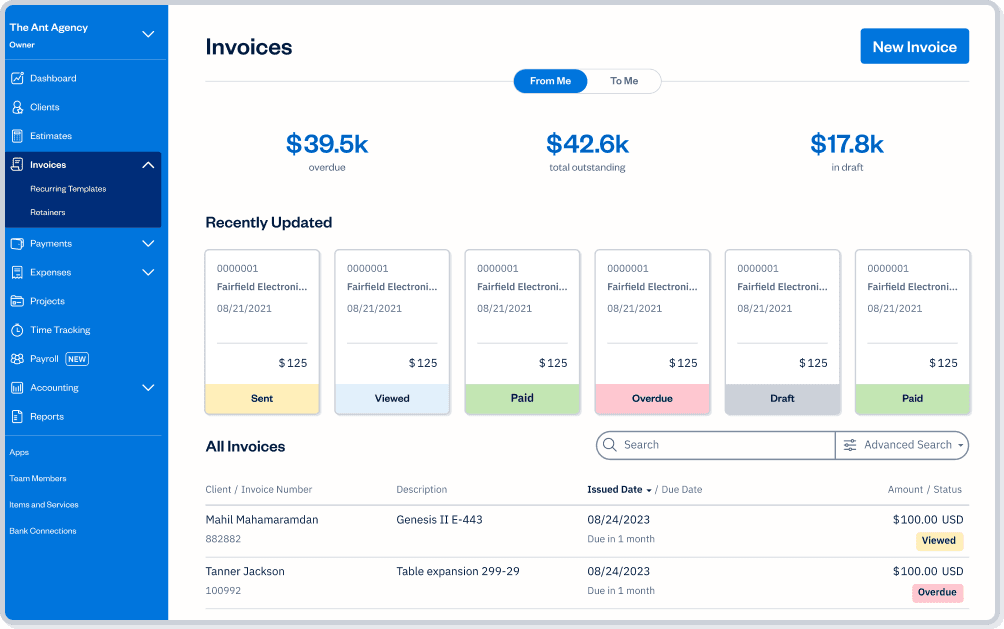
Running a business is more than just invoicing. Payments, recurring invoices, and managing the full scope of each project all impact the future success of your business. With FreshBooks, you can ensure clients can pay invoices as quickly and easily as possible while managing client communication and setting your bookkeeping up for tax time success. Check out the comparison chart below to see if your business needs the full force of the FreshBooks platform.
Downloadable estimate template
vs
FreshBooks
| Features | Free Invoice Generator |  |
|---|---|---|
Customizable invoice templates |  | |
Printable for clients who love snail mail | | |
Email invoices to clients for free | | |
Accept safe and secure online payments and credit card payments on invoices |  | |
Add a payment schedule, automate late payment reminders and fees | | |
Keep track at a glance of who’s paid and who has not | | |
Easily set up deposits for projects | | |
Easily add a discount to your invoice | | |
Automate your invoices for recurring work and subscriptions | | |
Create and send invoices from your mobile device | | |
Submit GST/HST returns & review past submissions | | |
Get a GST return report | | |
Sign up for a free FreshBooks trial today!
Try It FreeTry It Free for 30 Days. No credit card required.
Cancel anytime.
Have Questions? We Have Answers!
FreshBooks tools for small businesses