As an accounting professional, are you using FreshBooks to its full potential? Take a look at the latest features to find out



At FreshBooks, we’re dedicated to continuously improving our software to make it more powerful and user-friendly for accounting professionals. This includes adding and refining new features, guided by user feedback, rigorous testing, and evolving industry standards.
To catch you up on what you might have missed in 2024, we’ve rounded up some of FreshBooks’ latest updates. Each enhancement was designed to improve financial accuracy, provide better client service, and streamline your accounting workflow to help you save time.
 Table of Contents
1. New Audit Log Report
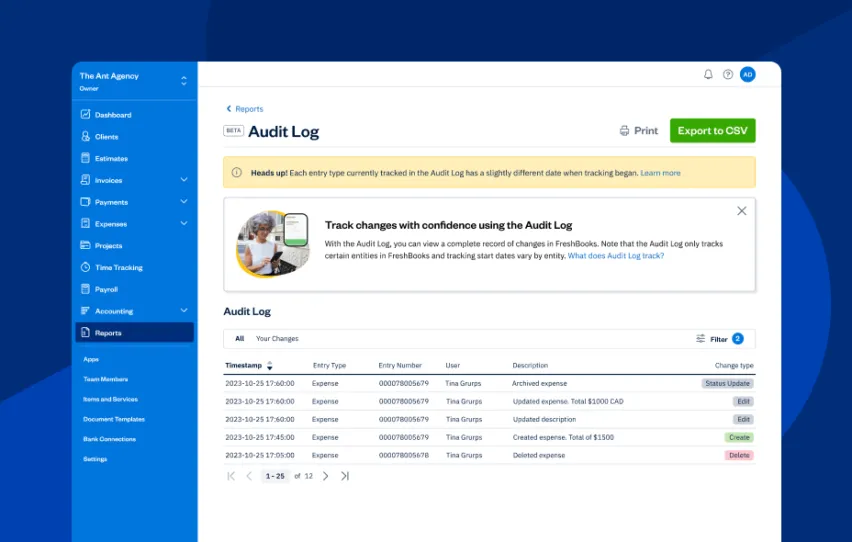 FreshBooks Audit Log is a dynamic, sequential record that tracks the history of financial transactions back to their origins. You can track all changes made to expenses and invoices by filtering by client, change type, entity type, or user to get a customized view of the changes. This report is an essential part of robust financial management and governance. Additionally, the Audit Log Report can help manage cash flow by providing a detailed history of financial transactions.
The Audit Log report provides a detailed, chronological history of financial transactions, ensuring transparency and strengthening financial management and governance.
 The Future of Accounting: 8 Game-Changing Trends to Watch for in 2025
 5 Ways to Work Better With Your Clients in FreshBooks, for Accountants
 11 Advisory Services You Should Be Charging For—and Why
Some key features of the FreshBooks Audit Log report:
- It provides transparent, traceable, and reliable documentation of all financial activities.
- It ensures accountability and accuracy in financial reporting.
- It helps meet financial regulation requirements (particularly in Canada, which has specific rules about record-keeping).
- It helps resolve disputes by providing a clear timeline and details, making it easier to determine any issues a client may present.
2. Enhanced General Ledger Report
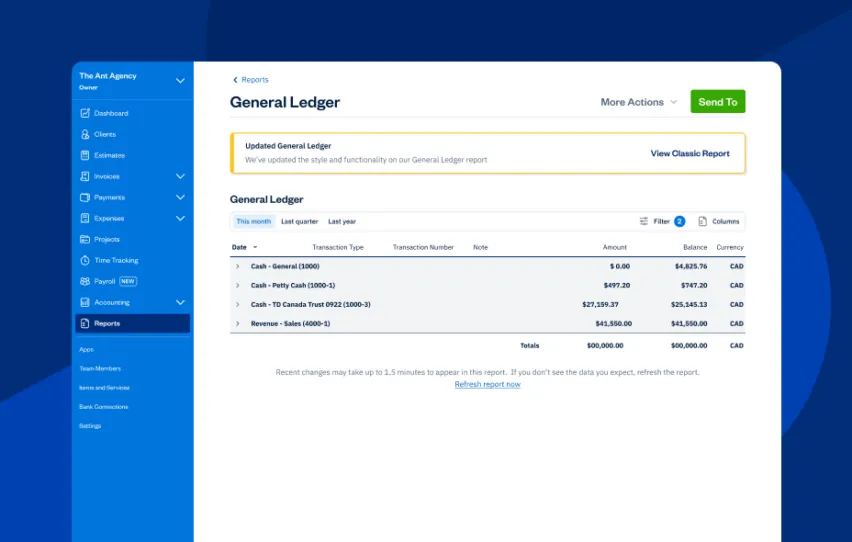 The FreshBooks General Ledger report is a key feature of FreshBooks accounting software. It shows details of every transaction going in and out of your clients’ accounts on an accrual basis. These transactions are generated from the activity in FreshBooks, including sending invoices, tracking expenses, accepting payments, and logging other income.
The updated General Ledger includes:
- An updated compact view that allows you to review more data more quickly.
- A new summary views that show top-line numbers, with the option to switch to a detailed view.
- More comprehensive drill-down functionality that allows you to investigate and deep dive into every number on your report.
- New customization features allow you to organize and view your report data exactly the way you prefer.
3. New FreshBooks Payroll
 FreshBooks Payroll powered by Gusto is a paid add-on that allows small businesses in the U.S. to run payroll for employees and contractor payments, file payroll taxes automatically for each particular tax, and maintain labor compliance.
Launched in 2024, FreshBooks Payroll now includes exciting new enhancements, such as:
- New users signing up for FreshBooks Payroll now have the option to include historical pay runs from previous payroll providers before running their first payroll in FreshBooks.
- Journal entries are automatically written to the chart of accounts when running payroll.
- You can now add 1099 contractors, run contractor payments while paying at least one W-2 employee, and access the Contractor Payment report.
4. Payments Updates
 FreshBooks Payments powered by Stripe allows business owners to offer their customers the option of paying directly through invoices. The feature automatically records each payment in their FreshBooks account. FreshBooks Payments can help manage cash flow by providing various payment options.
Advanced Payments, also known as a virtual terminal, is an add-on that can be included in a business owner’s subscription. It allows them to proactively charge their customers’ credit cards with the details they’ve provided.
Using Advanced Payments, business owners can quickly process client credit card payments on invoices, over the phone, or in person. For repeat clients, card information can be securely saved for future invoices and recurring payments, streamlining the process.
- Clients can accept payments directly from invoices, with options like credit cards, ACH, Apple Pay, and Google Pay.
- You can use filters to create custom views of transactions and see payment details for any transaction.
- Users can select any declined credit card transaction processed by FreshBooks Payments or Stripe Standard to review the reason.
5. Accountant Hub Improvements
 FreshBooks Accountant Hub is a centralized dashboard designed for our Accounting Partner Program members. It provides seamless access to all their clients’ accounts, making it easy to switch between them. Key features of the Accountant Hub include:
- Set up your accounts and invite your clients. Once you’re in, you have one-click access to your client’s information and bookkeeping.
- Manage everything in one place, from financial reporting and journal entries to a customizable chart of accounts.
- Tailor workflows for each client.
- Get discounts and dedicated, accountant-centric support from real humans.
The improved features to the Accountant Hub include:
- The Accountant Hub includes a welcome video that walks through its key features.
- Clients can access a trial countdown and an onboarding checklist to guide their setup.
- Users can filter clients by status for easier account management.
6. Updated Journal Entries
 Journal entries automatically record all client transactions, capturing activities like sending invoices, accepting payments, and creating credits or expenses.
With journal entry enhancements in FreshBooks, you can:
- See all manually created journal entries in a dedicated journal entries section.
- Create manual journal entries for more complex transactions like depreciation, fixed assets, and loans.
7. Modified Bank Connections
 FreshBooks Bank connections link business owners’ bank and credit card accounts to their FreshBooks accounts. This allows for easy payments, bank reconciliations, and expense categorization.
By linking bank accounts to FreshBooks, business owners can also manage cash flow more effectively through comprehensive financial reporting options.
Here’s what the new bank connections modifications can do:
- All bank connections in Bank Reconciliation now display the last imported on-date for posted transactions.
- When creating new Bank Connections with Yodlee, you can now import up to 365 days of transactions with eligible banks.
- Any connected bank accounts via bank connections or bank reconciliations also used for payroll runs will not import expenses automatically to avoid duplicate expenses.

Get Ready to Be (Even) More Efficient
FreshBooks exists to make accounting easier and more streamlined for accountants and their clients. That’s why we’re always dreaming up and integrating enhancements and updates. FreshBooks experts can provide specialized support and tailored recommendations, ensuring a smooth and effective accounting process.
Elevate your practice and deliver exceptional value to your clients by joining the FreshBooks Accounting Partner Program. This program empowers you to grow your advisory practice with innovative, collaborative tools, streamlined workflows, and ongoing education. As a Partner, you’ll enjoy exclusive perks and dedicated support, ensuring you have everything you need to succeed. FreshBooks’ intuitive platform is fully loaded with features that make it easy to streamline your accounting processes and collaborate seamlessly with clients. Take your practice to the next level—become a FreshBooks Accounting Partner today.

Written by Heather Hudson, Freelance Contributor
Posted on December 12, 2024
Freshly picked for you
 12 Useful Features You Might Not Know Are in FreshBooks
 10 Essential Accounting and Bookkeeping Tools to Set Up Your Clients for Success
 12 Best FreshBooks Apps for Accountants
 100+ Apps and Integrations to Boost Your Workflows
 11 Advisory Services You Should Be Charging For—and Why
 Accountants: Best Practices for Client Onboarding to FreshBooks